 roozbehk
7987d2375d
roozbehk
7987d2375d
All checks were successful
Deploy to Production / deploy (push) Successful in 3m16s
Reviewed-on: #4 |
||
|---|---|---|
| .gitea/workflows | ||
| backend | ||
| frontend | ||
| .gitignore | ||
| ecosystem.config.js | ||
| image.png | ||
| package-lock.json | ||
| package.json | ||
| README.md | ||

Aero Echo
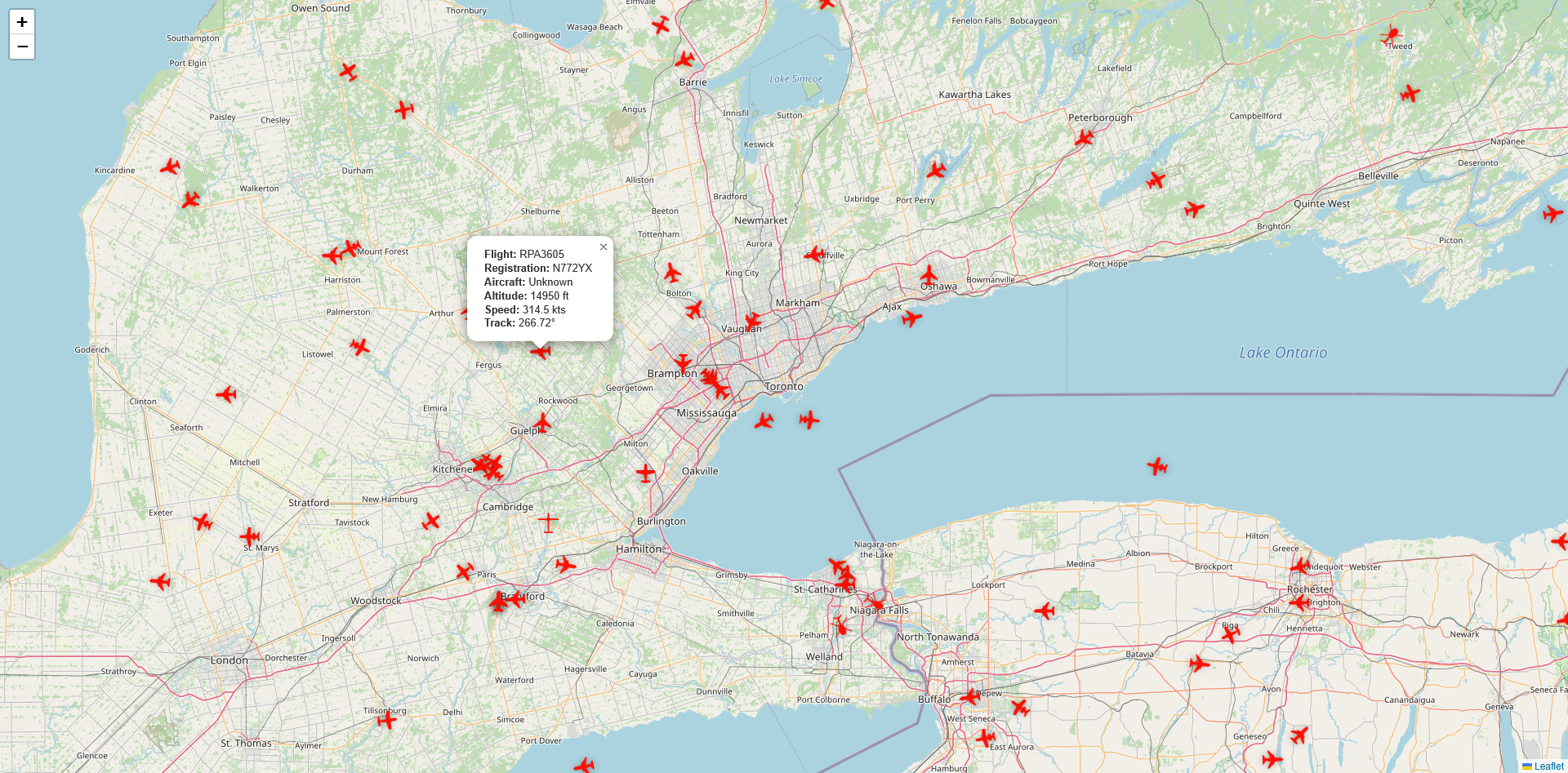
A real-time flight tracking application that displays live aircraft movements on an interactive map.
🚀 Features
- Real-Time Tracking: Watch aircraft positions update instantly with WebSocket connections
- Global Coverage: Track flights worldwide with extensive ADS-B network coverage
- Live Data: Access comprehensive flight details including altitude, speed, and heading
- Smart Filtering: Flight data is filtered based on map zoom level and boundaries for optimal performance
- Responsive Design: Works seamlessly on desktop and mobile devices
🛠️ Technologies Used
Frontend
- Next.js - React framework for optimized performance and seamless navigation
- Socket.IO Client - WebSocket technology for real-time bidirectional communication
- Tailwind CSS - Utility-first CSS framework for styling
- Lucide React - Beautiful icon library
Backend
- Node.js - JavaScript runtime environment
- Express - Web application framework for Node.js
- Socket.IO - Real-time event-based communication
- ADSB.one API - Real-time aircraft data streaming
📋 Prerequisites
Before you begin, ensure you have the following installed:
- Node.js (v18 or higher)
- npm or yarn
- Git
🔧 Installation
⚙️ Configuration
Backend Configuration
Create a .env file in the backend directory:
NODE_ENV=development
PORT=3001
Frontend Configuration
Create a .env.local file in the frontend directory:
NEXT_PUBLIC_API_URL=http://localhost:3001/api/v1
NEXT_PUBLIC_SOCKET_SERVER_URL=http://localhost:3001
🚀 Running the Application
npm run dev
📡 API Limitations
This application uses the ADSB.one API with the following constraints:
- Coverage Radius: Limited to 250 nautical miles from a specific location
- Rate Limiting: Maximum 1 request per second to the API
- Data Caching: Server-side global variable caching is implemented to optimize performance and respect rate limits
- Smart Filtering: Flight data is filtered based on map zoom level and boundaries to provide relevant information efficiently
🏗️ Architecture
Data Flow
- Backend makes requests to ADSB.one API (max 1 req/sec)
- Flight data is cached in a global variable on the server
- Frontend connects to backend via Socket.IO
- Backend filters and sends relevant data based on map boundaries
- Frontend receives real-time updates and displays aircraft on the map
Caching Strategy
To respect the API's 1 request/second limit, the backend:
- Maintains a global cache of all aircraft data
- Updates the cache once per second
- Filters data based on client's map view
- Pushes only relevant data to connected clients
🤝 Contributing
Contributions are welcome! Please feel free to submit a Pull Request.
- Fork the project
- Create your feature branch (
git checkout -b feature/AmazingFeature) - Commit your changes (
git commit -m 'Add some AmazingFeature') - Push to the branch (
git push origin feature/AmazingFeature) - Open a Pull Request
📝 License
This project is licensed under the MIT License - see the LICENSE file for details.
🙏 Acknowledgments
- ADSB.one for providing free aircraft tracking data
- Socket.IO for real-time communication
- Next.js for the amazing React framework
- Tailwind CSS for the utility-first CSS framework
📞 Contact
Your Name - @yourtwitter
Live Demo: https://aeroecho.roozbehk.com/
🐛 Known Issues
- Coverage limited to 250nm radius from configured location
- API rate limiting may cause delays during high traffic
- Some aircraft may not appear if outside the coverage area
🔮 Future Enhancements
- Add flight path history
- Implement aircraft search functionality
- Add airport information overlays
- Create mobile app version
- Add weather layer integration
- Implement multiple location support